
Colorify: Coloring Book Maker
Yoya MobilePhotography
4.4292.00 Reviews
- Version
- 1.0.55
- Installs
- 100.00K
- Age Rating
- Everyone
Screenshots


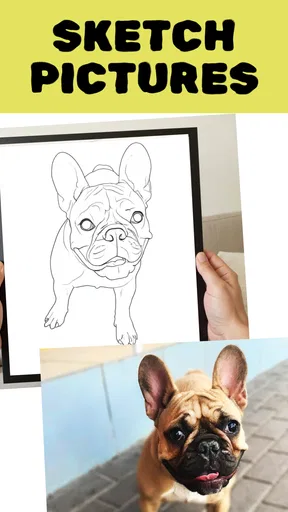
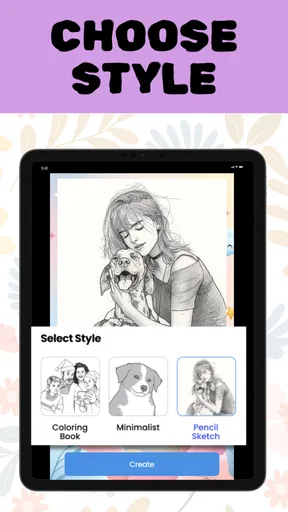
Our Review of Colorify: Coloring Book Maker
 Analysis by Appyee
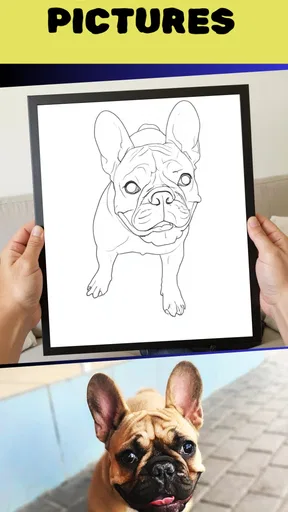
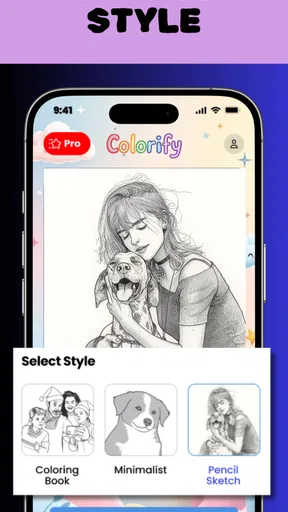
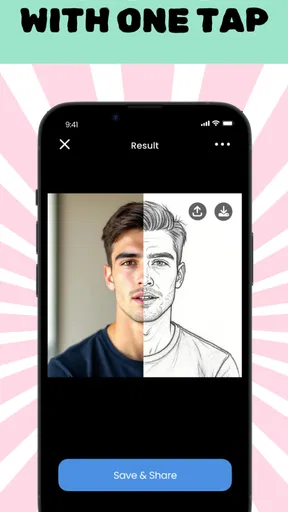
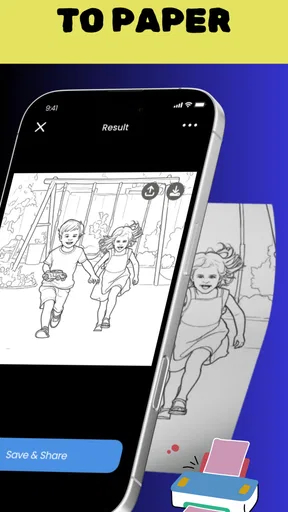
I like the idea behind Colorify: Coloring Book Maker because it turns a photo you already care about into a hands-on creative project. Rather than starting with a blank canvas or choosing only from a set of premade pages, you can use an image as the starting point for a coloring page. That makes the app feel personal: a family snapshot, a pet portrait, or a favorite holiday picture can become something to color, print, and keep.
That photo-first approach is also the main reason I’d consider it over a conventional coloring app. It gives you a simple way to make a page with a subject that matters to you, even if you don’t draw. I’d still treat the result as a creative interpretation of a picture, not a perfect tracing: photos with clear shapes and uncluttered backgrounds are likely to make more satisfying pages than busy scenes full of fine detail.
A photo-based idea with practical appeal
For an everyday example, imagine having a few minutes to prepare a quiet activity for a child before a family visit. A familiar picture of the family dog could be a more engaging page than a random design, and printing it gives the child something they can color away from a screen. The same approach can work for a birthday activity, a classroom project, or a small personal gift, provided you have access to a printer and are happy to do a little preparation.
I’d choose the source image with the finished page in mind. A close-up portrait against a plain background is easier to read as line art than a distant photo with lots of people, furniture, and scenery competing for attention. Strong light and clear separation between the subject and its surroundings can also help the important shapes stand out. This is a useful trade-off to understand before you start: the app can make a photo into a coloring project, but the original image still shapes how enjoyable the page will be.
Who will get the most from it
This is a good fit if you want coloring pages to feel personal, or if you enjoy the idea of turning your own photos into a physical activity. Parents, teachers, craft-minded users, and anyone who likes making small, customized projects may find that more appealing than working through a standard library of designs. It can also be a nice option for someone who wants a low-pressure creative task but doesn’t want to learn drawing tools first.
I would be less likely to recommend it to someone who only wants a large, ready-to-use collection of polished coloring pages, or who expects every photo to become clean line art with no adjustment or trial and error. A dedicated coloring book app is simpler when the goal is to open a page and start filling it immediately. A full drawing or image-editing app gives more control when you want to refine outlines precisely, but it also asks more of you. Colorify sits between those choices: it offers a personal starting point without being a replacement for professional illustration software.
Small workflow choices that make a difference
One practical way to use the app is to keep a small folder of candidate pictures rather than choosing in a hurry. Try a few different kinds of image—a clear portrait, a simple object, and a scene with more background—and compare which one makes the most legible page. That quick test helps you learn what suits your taste before spending time coloring a result that feels too crowded.
For pages intended for printing, think about the person who will color them. Younger children may enjoy larger, simpler areas, while an older child or adult may prefer more intricate shapes. If a photo has a cluttered background, cropping it before using it can make the main subject easier to recognize and give the finished page a clearer focus. Printing is also a useful checkpoint: a design that looks detailed on a phone may feel cramped on paper, so a quick test print can save time and materials.
There is a small but important distinction between making a page for screen use and making one for a physical activity. On a screen, you can zoom in and work on tiny areas; on paper, the line weight, page size, and available coloring tools matter more. I’d use simpler images for younger children and reserve busy photos for a more patient colorist. That isn’t a flaw unique to this app—it’s part of adapting a photograph to a coloring format—but it affects whether the finished result feels inviting.
Unleashing Creativity with Ease
When I first downloaded Colorify: Coloring Book Maker, I was immediately drawn to its user-friendly interface. You don’t need to be a tech wizard to navigate through the app, which is a relief for those of us who just want to get straight into the coloring action. The app opens up to a gallery of intricate designs ranging from mandalas to nature scenes and even quirky abstracts. Trust me, there’s something here for everyone.
What makes this app stand out is its simple yet powerful coloring tools. You can choose from a wide palette of colors, and the app allows you to adjust the brush size to get into those tiny details or cover larger areas with ease. Plus, there’s an undo button that’s quite literally a lifesaver for those occasional slips of the finger.
More Than Just Coloring
But wait, there’s more! Colorify isn’t just about filling in colors. It offers a unique feature where you can create your own designs. For those of you who love to sketch, this is a game-changer. You can use the app to draw your own designs and then dive right into coloring them. It’s like having a digital sketchpad and coloring book rolled into one.
Another cool feature is the ability to save and share your creations. Once you’re satisfied with your artwork, you can save it to your gallery or share it directly with your friends on social media. Think of the app as a digital portfolio where you can showcase your evolving artistic prowess.
The Zen Factor
One of my favorite things about Colorify is the sheer relaxation it provides. Coloring has been shown to reduce stress and anxiety, and after using the app, I can vouch for its calming effects. There’s something incredibly satisfying about watching a black-and-white image come to life with color. It’s like meditation, but with a splash of creativity.
The app also comes with soothing background music, which you can toggle on or off depending on your preference. Personally, I find the gentle tunes enhance the overall experience, making it a perfect way to unwind after a hectic day.
Room for Improvement?
While Colorify is a fantastic app, it’s not without its quirks. Occasionally, the app can lag, especially when working on highly detailed images. However, this is minor and doesn’t significantly detract from the overall experience. I’d also love to see more frequent updates with new designs to keep the creativity flowing.
On the plus side, the app doesn’t bombard you with ads, which is a breath of fresh air in the world of free apps. You can enjoy uninterrupted coloring sessions without pesky pop-ups.
That mix of photo conversion, drawing, coloring, and sharing makes the app more flexible than a basic digital coloring book, though each activity serves a different purpose. If I’m in the mood to relax immediately, a ready-made page is the quickest route. If I want a more personal project, I’d start with a photo, then take time to see whether its shapes translate well. And if I want exact control over every outline, I’d reach for a dedicated drawing editor instead. The useful middle ground here is being able to move from an image idea into coloring without needing to build the whole design from scratch.
Because the app is free to download, it’s easy to try without committing to a purchase. It has a 4.7 average from around 7,700 ratings, and has been installed over 100,000 times. Those figures suggest that plenty of people have tried it, but they don’t tell me whether the photo-to-page workflow will suit a particular image or coloring style. I’d judge that for myself with a simple, non-important picture before planning a larger project.
Version context and what I’d watch
Yoya Mobile’s photography app is currently at version 1.0.23, following its release on October 16, 2025. That gives a useful snapshot of where the product stands, but a version number alone doesn’t establish which features have changed or how much the experience has evolved. For an existing user, I’d focus on whether the current build feels dependable for saving and sharing work, and whether the available options continue to support the kind of pages they actually make.
The app is free, with in-app purchases ranging from $6.99 to $34.99 per item. I’d explore the free experience first and only consider paying if a particular paid option clearly fits a project I plan to make. That is especially sensible for occasional use: a one-off page for a family activity may not justify spending, while someone who regularly creates personalized projects may value additional options if they find them useful. It is rated for Everyone, and its minimum operating-system requirement is Android 7.0.
For anyone deciding whether to keep using it, the practical things to watch are straightforward: do your chosen photos produce pages you enjoy coloring, can you complete the workflow comfortably on your device, and does the app remain useful after the novelty of converting a first image wears off? Those questions matter more than expecting every update to transform the experience. I’d also keep original photos untouched and treat saved coloring results as separate creative copies, so the source image remains available if I want to try a different crop or subject later.
A few sensible expectations
It is worth thinking about privacy and sharing in ordinary, practical terms whenever personal photos are involved. I would choose an image I’m comfortable using in a creative app, and I’d be deliberate about what I share publicly. A picture made for a child or family event doesn’t need to be posted to social media to be useful; saving it for printing or sharing it directly with people I know may be enough. That keeps the creative activity focused on the people who will actually use the page.
Colorify is also not necessarily the best fit for every kind of photograph. A group shot with overlapping faces, a dim indoor scene, or a landscape packed with fine texture can be harder to turn into an inviting page than one clear subject against a simple background. If an early result feels messy, I’d change the crop or pick a different image before assuming the whole idea has failed. If the goal is a specific, clean illustration, drawing one manually or choosing a professionally prepared page is likely to be more predictable.
For children, the app’s Everyone age rating is useful context, but I’d still decide how they will use a phone or tablet and whether an adult should help with selecting photos, printing, or sharing. The coloring itself can be the easy part; choosing a suitable image and moving the finished page into a real-world activity may take a little guidance. That makes the app more compelling as a shared craft tool than as a substitute for every screen-free activity.
Final Thoughts
All in all, Colorify: Coloring Book Maker is a delightful app for anyone looking to indulge their creative side or simply find a peaceful escape from the daily grind. Whether you’re a seasoned artist or a beginner, this app offers something for everyone. With its intuitive interface, vast array of designs, and stress-relieving features, it’s an app that deserves a spot on your home screen.
If you’re ready to dive into the world of digital coloring, Colorify offers a colorful journey that’s just a download away. Happy coloring!
Verdict
Strengths of Colorify: Coloring Book Maker
- Intuitive user interface for easy navigation.
- Wide range of colors and palettes available.
- Offline mode supports coloring without internet.
- Regular updates with new designs and features.
- Supports sharing creations on social media.
Limitations of Colorify: Coloring Book Maker
- Contains ads that can interrupt the experience.
- Limited free designs; many are premium.
- No option for custom color palettes.
- Requires in-app purchases for full access.
- High battery consumption during use.
Similar Picks in This Category
View All
Google Photos
Google LLC4.4

Gallery
Google LLC4.2

Picsart AI Photo Editor, Video
PicsArt, Inc.3.9

B612 AI Photo&Video Editor
SNOW Corporation4.1

BeautyPlus-Selfie Photo Editor
PIXOCIAL TECHNOLOGY (SINGAPORE) PTE. LTD.4.5

Remini - AI Photo Enhancer
Bending Spoons4.1
Frequently Asked Questions
What is Colorify: Coloring Book Maker?
Colorify: Coloring Book Maker is a versatile app that lets users create and color their own digital coloring books. With a variety of templates and customization options, it caters to both beginners and experienced artists. The app is designed to provide a relaxing and creative experience for all ages.
Is Colorify available for both Android and iOS?
Yes, Colorify: Coloring Book Maker is available on both Android and iOS platforms. Users can download it from the Google Play Store for Android devices and the App Store for iOS devices. This ensures a seamless experience across different devices, making it accessible to a wide audience.
Does Colorify offer any in-app purchases or subscriptions?
Colorify offers a range of free features; however, it also includes optional in-app purchases or subscriptions. These purchases unlock additional templates, advanced tools, and an ad-free experience. Users can choose to enhance their creative journey with these premium options, but it's entirely optional.
Can I share my creations from Colorify on social media?
Yes, Colorify allows you to share your finished artworks directly on social media platforms like Instagram, Facebook, and Twitter. The app provides easy-to-use sharing options, enabling users to showcase their creativity with friends and followers, fostering a community of art enthusiasts.
Is an internet connection required to use Colorify?
An internet connection is not strictly necessary to use Colorify, as you can access and color existing templates offline. However, certain features like downloading new templates or sharing creations online do require internet access. This flexibility allows users to enjoy the app both online and offline.
